
Payment Links
Digiteal offers multiple ways to generate payment links depending on your integration needs. You can generate a standard payment request, construct a direct payment button URL, or create a shortened link for SMS and character-limited channels.
1. Choosing the Right Method: POST vs. GET
Digiteal provides both a server-side POST method and a client-side GET method. While the ultimate result—a payment page—is the same, the architectural differences are significant.
The Server-Side Approach (Recommended)
Use POST /api/v1/payment-request
This is the standard and most secure way to generate a payment link. You should use this method whenever you have a backend server capable of making API calls.
- Security: Your API credentials remain safely hidden on your server.
- Data Integrity: Because the request is made server-to-server, the payload (like the amounts) is entirely hidden from the end-user. They only receive the final, secure payment URL.
- Control: It allows you to reliably create a record in your database before the user ever sees the payment page.
The Front-End / Embed Approach
Use GET /api/v1/payment-request/pay-button/execute
If you need to generate a link directly in the front-end, in a static HTML email template, or on a platform where you cannot execute backend code, this GET request is your go-to solution.
- Convenience: You can dynamically construct this URL directly in HTML
<a>tags or email builders without needing a server to process the request first. - The Trade-off (Visible Parameters): Because all parameters are passed in the URL string, they are readable and editable by the end-user. A savvy user could potentially alter the amounts in their address bar before hitting enter. We have however a shortlink API that can obfuscate these parameters, more information below.
- Best Practice: If you use this method, you must rely on Webhooks to verify the final paid amount against your internal order records before fulfilling a service or shipping a product. Do not assume the requested amount was the amount actually paid.
2. Integration Best Practices
Building a robust payment flow requires understanding how Digiteal interacts with acquirers, browsers, and your own backend. Please follow these guidelines to ensure a smooth user experience.
Redirection vs. Iframes
Never use iframes to display Digiteal payment pages. While our initial payment page might load inside an iframe, the transaction will almost certainly fail during the process for the following reasons:
- 3D Secure Blocks Iframes: When users pay by credit card (Visa/Mastercard), they must validate the payment via 3D Secure on their bank's website. To prevent phishing and clickjacking, almost all banks strictly prohibit their authentication pages from loading inside an iframe. The process will halt with a blank page or a "connection refused" error.
- App-to-App Transitions Fail: Methods like Bancontact often require the user to open an external banking app. Transitioning from a web page trapped in an iframe to an external mobile app is technically unstable and frequently causes the payment session to be lost upon return.
- User Trust: Users are trained to look for a secure URL and a padlock icon before entering bank details. If your URL remains in the address bar while they are supposed to be on a banking page, conversion rates will drop drastically due to mistrust. Solution: Always use a full top-level page redirect, or open the link in a new secure tab (
target="_blank").
Handling Payment Errors
If an error occurs during payment initiation, Digiteal sends a webhook with the status PAYMENT_INITIATION_ERROR (or PAYMENT_INITIATION_ERROR_V2). The payload may include the fields errorCode and errorMessage in case the payment wasn't cancelled due to a timeout.
⚠️ Important Error Handling Rules:
- Do not display raw errors to users: Messages like "Cancelled from PSP" are technical jargon meant for developers. Displaying these directly will confuse your customers.
- Show generic UI errors: Always display a clear, generic fallback message to the user, such as "An error occurred during your payment. Please try again or use another payment method."
- Log for debugging only: Save the exact
errorCodeanderrorMessageto your backend logs so your developers can investigate if needed.- Do not rely on mapping: The content of these messages depends entirely on the specific acquirer processing the payment. They evolve over time, and they are not guaranteed to be present (e.g., in the case of a timeout). Trying to map them to specific UI translations is not maintainable.
Testing Your Integration
To ensure robust end-to-end testing, be aware that test environment behaviors vary depending on the acquirer.
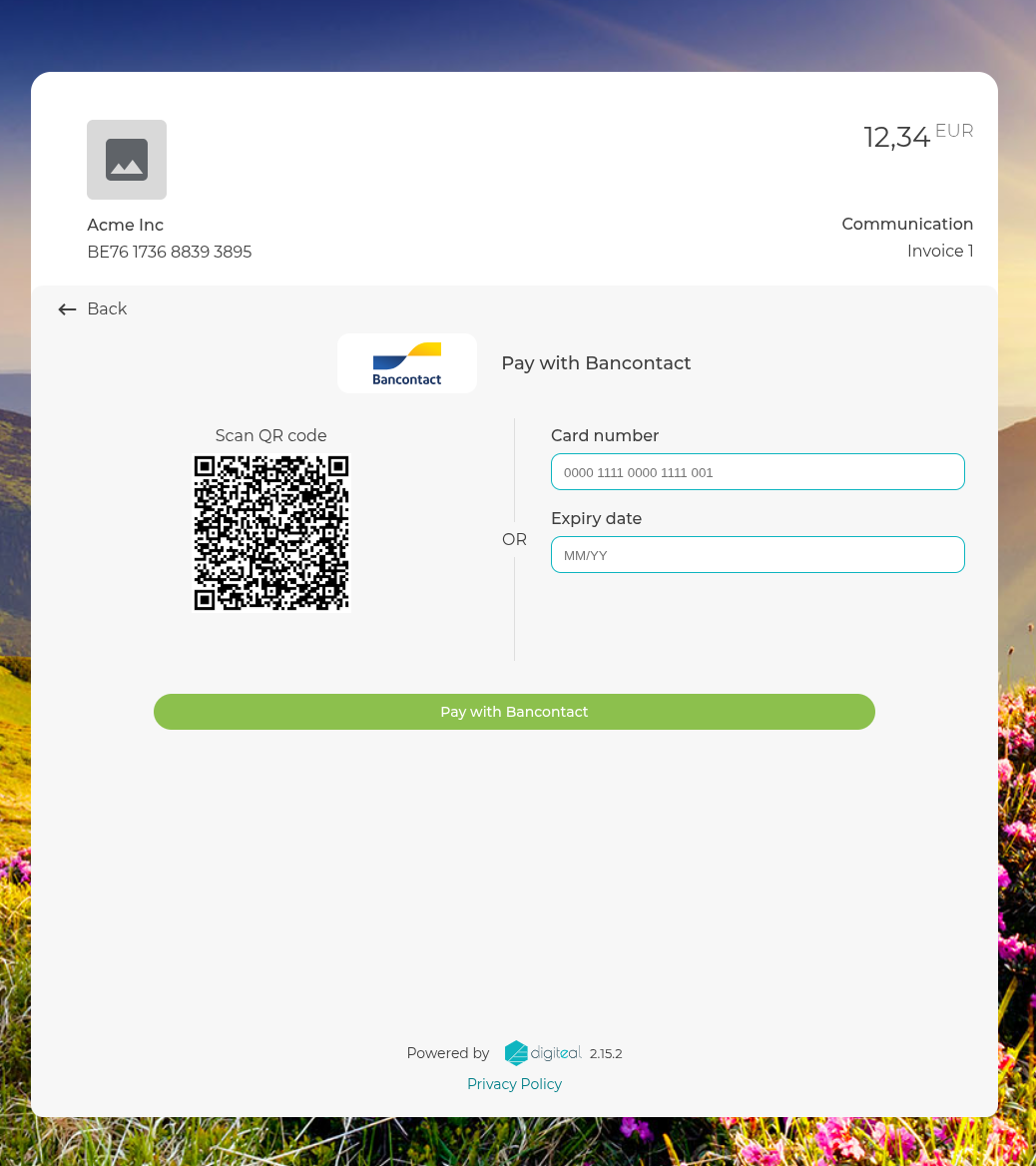
- Bancontact (Highly Recommended): The most stable and predictable way to test full redirection flows is using the Bancontact QR Code method in our test environment. Scan the generated QR code with your phone. You will be redirected to the acquirer's test environment, where a dropdown menu allows you to perfectly simulate specific scenarios (success, refused, error, etc.).

- Visa / Mastercard / Maestro: You can use the following classic test card numbers to simulate different 3D-Secure authentication scenarios.
| Card Brand | Card Number | Scenario | Description |
|---|---|---|---|
| Maestro | 6799990000000000011 | Completed | Transaction completed (3D-verification completed). |
| Mastercard | 5500000000000004 | Completed | Transaction completed (3D-verification completed). |
| Visa / co-branded | 4111111111111111 or 4761340000000019 | Completed | Transaction completed (3D-verification completed). |
| Visa / co-branded | 4917300000000008 | In process | Transaction not yet completed. After 3 minutes, the status becomes cancelled. |
| Visa / co-branded | 4012001037461114 | Rejected | Transaction refused (3D-authentication failed). |
⚠️ Note on Card Testing: While these cards are provided for basic authorization testing, the redirection flows do not consistently work with all Visa and Mastercard test cards in the test environment. If your main goal is testing the reliability of your end-to-end redirection, we strongly advise relying on the Bancontact QR code flow.
Here is the updated section with the anchors added to the remittanceInfo and creditorReference descriptions, matching the style used for amountInCents.
3. Standard Payment Request (POST)
Endpoint: POST /api/v1/payment-request
This is the standard method for creating a payment request. It generates unique URLs that you can share with your customers to collect payments on web or mobile.
Base Parameters
Send a POST request with the following JSON body parameters. To identify the creditor, you must pass either a requesterVAT or a requesterIdentificationNumber:
| Parameter | Type | Required | Description |
|---|---|---|---|
amountInCents | string | Conditional | A strict, fixed amount to charge in cents (e.g., 1234 for 12.34). This is not required if you wish to use Flexible Pricing & Suggested Amounts. |
confirmationURL | string | Yes | The URL where the user is redirected after a successful payment. |
errorURL | string | Yes | The URL where the user is redirected if the payment fails. |
requesterVAT | string | Conditional | The VAT number of the creditor. Required if requesterIdentificationNumber is not provided. |
requesterIdentificationNumber | string | Conditional | Identification number of the creditor. Required if requesterVAT is not provided. |
iban | string | Conditional | The IBAN of the creditor. Required if you have registered multiple IBAN numbers on your account to specify which one should receive the funds. |
paymentInternalId | string | No | The internal identifier of the payment as known by you (the creditor). Maximum length of 255 characters. |
remittanceInfo | string | No | An unstructured string used as communication in the payment (e.g., "Invoice 12345"). Cannot be used alongside creditorReference. Leave both empty to enable User-Defined Communication. |
creditorReference | string | No | A structured communication/reference for the payment (e.g., Belgian Structured Communication +++123/4567/89012+++). Cannot be used alongside remittanceInfo. Leave both empty to enable User-Defined Communication. |
🔗 Pro-Tip: Reconciliation with
paymentInternalId> Passing your system's unique identifier intopaymentInternalIdmakes reconciliation seamless. When you receive webhook notifications tied to this payment's lifecycle, this ID will be included in the payload, allowing you to instantly match the Digiteal payment status to your internal database records.
Session & Link Lifecycle Parameters
| Parameter | Type | Description |
|---|---|---|
multiple | boolean | If true, the link can be used for multiple payments. Default is false (single-use). |
🔄 Reusable Links (
multiple): Normally, a payment link stops working once a payment has been terminated. If you want to create a generic link that can be used repeatedly by different users, set themultipleflag totrue.
Expiration & Late Fees
You can configure payment links to expire on a specific date, or to automatically apply a late fee once a deadline has passed. This is ideal for invoices with strict terms.
| Parameter | Type | Description |
|---|---|---|
expiryDateTime | string | The exact instant the payment is due (e.g., "2025-11-14T10:30:00.123Z"). If no fees are provided, the link becomes invalid after this date. |
feeInCents | string | The late fee to apply, expressed in cents (e.g., 250 for 2.50). If defined alongside expiryDateTime, the link remains valid, but the amount automatically increases by this fee after the expiration date. |
feeDescription | string | A description for the applied fee shown to the user (e.g., "Fine for late payment"). |
Flexible Pricing & Suggested Amounts
Instead of passing a fixed amount, you can leave the amount completely open or define ranges and suggestions. This is highly useful in debt collection scenarios where you want to propose a reasonable reimbursement amount or allow the debtor to choose an amount within a specific range.
⚠️ Important: You cannot use
minAmountInCents,maxAmountInCents, orsuggestedAmountInCentsif you are using a fixedamountInCents. They are mutually exclusive.
| Parameter | Type | Description |
|---|---|---|
minAmountInCents | integer | The minimum amount the user is allowed to pay. |
maxAmountInCents | integer | The maximum amount the user is allowed to pay. |
suggestedAmountInCents | integer | Pre-fills the payment form with a suggested reasonable amount, but the user can change it. |
User-Defined Communication
By default, the communication tied to a payment is strictly defined by the API request via remittanceInfo or creditorReference. However, you can allow your customers to provide their own payment reference.
If you omit both the remittanceInfo and creditorReference parameters from your payload, the payment page will automatically display an open text field. This allows the end-user to type in their own custom unstructured communication (which will be processed and returned as remittanceInfo in your webhook notifications and settlement reports).
Miscellaneous features
| Parameter | Type | Description |
|---|---|---|
emailOptin | boolean | Triggers a GDPR-compliant email opt-in prompt after the payment flow. |
paymentMethod | string | Forces the checkout to use only this single payment method (e.g., "BANCONTACT"). |
allowedPaymentMethods | string | A comma-separated list of payment methods to restrict the checkout to a specific subset (e.g., "VISA,MASTERCARD,BANCONTACT"). |
qrCode | boolean | If true, the QR code (for the Bancontact payment method) will be displayed directly. Perfect for in-person payments (e.g., door-to-door debt collection or law enforcement fines) where an agent presents a screen to the debtor. |
Post-Payment Email Collection (emailOptin)
emailOptin)When emailOptin is true, the payment flow allows you to collect the user's email address in a GDPR-compliant way after the payment is complete. This is perfect for sending future digital invoices or service updates.
❗️ Critical Webhook Requirement
You must subscribe to the
CUSTOMER_OPTINwebhook. If you do not register to this webhook, the email opt-in screen will not appear after the payment flow.
When a user opts in, you will receive a webhook payload containing the collected email:
{
  "executionTimestamp":"2024-03-18T23:11:14.060413",
  "creditorIdentificationNumber":"BE:VAT:BE0129306068",
  "customerInternalId":"54e5b890-b08b-4268-a374-5c3f13582c41",
  "channel":"DIGITEAL",
  "changeType":"OPTIN",
  "email":"[email protected]"
}
Example Request (using the Base parameters)
Note the -i flag in the cURL command below. Because the payment URLs are returned in the response headers, this flag ensures the headers are printed to your console.
curl -i -X POST [https://test.digiteal.eu/api/v1/payment-request](https://test.digiteal.eu/api/v1/payment-request) \
  -H "Authorization: Basic YOUR_BASE64_CREDENTIALS" \
  -H "Content-Type: application/json" \
  -d '{
    "amountInCents": 50000,
    "paymentInternalId": "ORDER-992384",
    "confirmationURL": "https://yourdomain.com/success",
    "errorURL": "https://yourdomain.com/error",
    "requesterVAT": "BE0863311183",
    "iban": "BE76173688393895",
    "remittanceInfo": "General Donation Link"
  }'
Handling the Response
Unlike standard REST APIs that return the payload in the JSON body, this endpoint returns the payment URLs and IDs directly in the HTTP response headers.
Look for the following headers in your 200 OK response:
payment-web-url&payment-url-intent: The URL to redirect the user to so they can complete the payment. (Note: These will return the exact same link; the separate headers remain for legacy mobile app compatibility).request-id: The internal identifier generated by Digiteal when the request is initially created. You should keep this logged, as it is highly useful to provide to our support team if you need assistance (it corresponds to our internal request_log).uuid: The unique identifier of the payment itself. You should save this as a primary reconciliation key. This UUID will appear in all payment webhooks throughout the payment lifecycle, and it is also the identifier you must use when initiating refunds.payment-request: The unique identifier for the payment request context. Save this! You can reference it later if you need to update a previously created payment (for example, adding fees and a new expiration date to an expired payment context).
Example Response Headers:
HTTP/2 200
date: Fri, 10 Apr 2026 11:14:38 GMT
content-type: text/plain
content-length: 0
server: nginx
request-id: fa3f2374-cd49-4528-92a8-b22f37e59e1d
uuid: 37d382de-1740-40e6-9902-b3bd3ead8e62
payment-url-intent: [https://test.digiteal.eu/transaction/redirect/payment-choice/37d382de-1740-40e6-9902-b3bd3ead8e62?language=en](https://test.digiteal.eu/transaction/redirect/payment-choice/37d382de-1740-40e6-9902-b3bd3ead8e62?language=en)
payment-web-url: [https://test.digiteal.eu/transaction/redirect/payment-choice/37d382de-1740-40e6-9902-b3bd3ead8e62?language=en](https://test.digiteal.eu/transaction/redirect/payment-choice/37d382de-1740-40e6-9902-b3bd3ead8e62?language=en)
payment-request: 245058c7-3e28-4810-970c-1ee7339db4ca
x-content-type-options: nosniff
4. Direct Payment Link (GET)
Endpoint: GET /api/v1/payment-request/pay-button/execute
If you prefer not to make a server-side POST request, you can construct a direct URL using query parameters. This is ideal for embedding directly into static email or HTML templates.
Key Query Parameters
You append these directly to the endpoint URL:
| Parameter | Type | Description |
|---|---|---|
requesterVAT | string | Belgian VAT number. Required if requesterIdentificationNumber is not provided. . |
requesterIdentificationNumber . | string | Identification number of the creditor. Required if requesterVAT is not provided. For the format of this parameter, see here |
amountInCents | integer | The fixed amount to pay in cents. Leave empty/omitted to let the user specify the amount. |
minAmountInCents | integer | The minimum amount to pay. Cannot be used if amountInCents is provided. |
maxAmountInCents | integer | The maximum amount to pay. Cannot be used if amountInCents is provided. |
suggestedAmountInCents | integer | The suggested amount to pay. Cannot be used if amountInCents is provided. |
paymentMethod | string | Restricts checkout to a single method (e.g., BANCONTACT). |
allowedPaymentMethods | string | A comma-separated list of allowed methods (e.g., VISA,MASTERCARD,BANCONTACT). |
qrCode | boolean | Set to true (along with BANCONTACT) to show a QR code directly for in-person collections. |
multiple | boolean | Set to true to allow the link to be used for multiple payments. Default is false (single-use). |
emailOptin | boolean | Set to true to display a GDPR-compliant prompt asking for the user's email address after payment completion (Requires the CUSTOMER_OPTIN webhook). |
paymentInternalId | string | The internal identifier of the payment as known by you for webhook reconciliation. |
iban | string | The IBAN of the creditor (defaults to the requester's default IBAN if omitted). |
remittanceInfo | string | An unstructured string used as communication in the payment. Cannot be used alongside creditorReference. Leave both empty to enable User-Defined Communication . |
creditorReference | string | A structured communication/reference for the payment (e.g., Belgian Structured Communication +++123/4567/89012+++). Cannot be used alongside remittanceInfo. Leave both empty to enable User-Defined Communication. |
confirmationURL | string | Redirect URL for successful payments. |
errorURL | string | Redirect URL for failed payments. |
Example Link Construction
You can place this directly in an href or markdown link. This example creates a reusable link (multiple=true) that prompts for an email opt-in after payment:
<a href="https://test.digiteal.eu/api/v1/payment-request/pay-button/execute?requesterVAT=BE0863311183&minAmountInCents=1000&suggestedAmountInCents=5000&multiple=true&emailOptin=true&allowedPaymentMethods=VISA,MASTERCARD,BANCONTACT&paymentInternalId=CAMP-2026&iban=BE76173688393895&remittanceInfo=Donation123&confirmationURL=https://yourdomain.com/success&errorURL=https://yourdomain.com/error">
  Pay Now
</a>
When a user clicks this link, the Digiteal system processes the parameters and returns a redirect to the actual payment page.
5. Shortening a Payment Link
Endpoint: POST /api/v1/shortLink
If you are using the GET endpoint to generate payment links, you can obfuscate the parameters by generating a short link. Also long URLs with many query parameters can break in SMS messages or look messy. You can use this endpoint to convert a long payment button link into a clean, shortened URL.
Request Parameters
| Parameter | Type | Required | Description |
|---|---|---|---|
longURL | string | Yes | The full URL you want to shorten. Note: It has a maximum length of 1024 characters and must contain digiteal.eu/api/v1/payment-request/pay-button/execute. |
Example Request
curl -X POST [https://test.digiteal.eu/api/v1/shortLink](https://test.digiteal.eu/api/v1/shortLink) \
  -H "Authorization: Basic YOUR_BASE64_CREDENTIALS" \
  -H "Content-Type: application/json" \
  -d '{
    "longURL": "https://test.digiteal.eu/api/v1/payment-request/pay-button/execute?requesterVAT=BE0406729809&amountInCents=4000&iban=BE72000000001616&language=en&remittanceInfo=Urgency%20Fund&paymentInternalId=URG-001&multiple=true&emailOptin=true&allowedPaymentMethods=BANCONTACT,PAYCONIQ&confirmationURL=https://api.myservice.com/paymentConfirmed&cancelURL=https://api.myservice.com/paymentCancelled&errorURL=https://api.myservice.com/paymentError"
  }'
Example Response
A successful request returns a 200 OK status with the shortened URL in the JSON body.
{
  "shortURL": "https://test.digiteal.eu/p/abcde"
}
6. Webhook Notifications
Webhooks are the only reliable way to automate fulfillment and know the final status of a transaction. Below is a high-level overview of the primary webhook events tied to the payment lifecycle and opt-in flows.
| Status | Description | Schema |
|---|---|---|
PAYMENT_INITIATED | The payment has been initiated and confirmed by the debtor | TransferOfFundsNotification |
PAYMENT_INITIATION_ERROR | The payment initiation failed | TransferOfFundsNotification |
PAYMENT_TRANSFERRED | The money has been successfully transferred to the creditor | TransferOfFundsNotification |
PAYMENT_INITIATED_V2 | The payment has been initiated and confirmed by the debtor | TransferOfFundsNotificationV2 |
PAYMENT_INITIATION_ERROR_V2 | The payment initiation failed | TransferOfFundsNotificationV2 |
PAYMENT_RECEIVED_IN_TRANSIT | The payment has been received securely on Digiteal's transit account | TransferOfFundsNotificationV2 |
REIMBURSEMENT_RECEIVED_FROM_CREDITOR | A reimbursement has arrived on Digiteal's transit account | TransferOfFundsNotificationV2 |
CUSTOMER_OPTIN | Required for emailOptin. The user has chosen to opt-in and provide their email address after the payment. | BulkPayoutCallbackV2 |
BULK_PAYOUT | A bulk payment settlement has been initiated containing an array of payout entries. | CustomerNotification |
💡 V2 webhooks introduce more granular tracking, specifically regarding transit accounts.
📖 You can find out more about these webhooks in the webhooks types section here
7. Refunds
Endpoint: POST /api/v1/refund
This API enables partial or total refunds of executed payments. The payment to refund must have already been transferred to the creditor in order to be refunded. When a user requests their money back, or an order is cancelled after payment completion, use this endpoint to return the funds programmatically.
🚧 Important Refund Rules & Constraints
Building a seamless refund flow requires adhering to specific payment method rules mandated by the acquirers:
- Time Limit (Credit Cards): Refunds for credit card-based payments (Visa, Mastercard) are strictly not possible after 180 days from the initial transaction date.
- PIS Payments Restricted: Refunds are not possible for PIS (Payment Initiation Services) payments.
Base Parameters
Send a POST request to the endpoint with the following parameters in the JSON body:
| Parameter | Type | Required | Description |
|---|---|---|---|
paymentUUID | string (uuid) | Yes | The UUID of the payment you want to refund. This is the uuid returned in the response headers of the original payment request or in the webhooks. |
amountInCents | integer | Yes | The amount to refund, expressed in cents. Must be ≥ 1 and cannot exceed the original transaction amount. |
Example Request
curl -X POST [https://test.digiteal.eu/api/v1/refund](https://test.digiteal.eu/api/v1/refund) \
  -H "Authorization: Basic YOUR_BASE64_CREDENTIALS" \
  -H "Content-Type: application/json" \
  -d '{
    "paymentUUID": "37d382de-1740-40e6-9902-b3bd3ead8e62",
    "amountInCents": 1500
  }'
Updated 4 months ago
What’s Next
Start integrating by learning about our webhook notifications or our payment request API reference