
Verification of Payee (VoP)
Overview
Verification of Payee (VoP) is a real-time verification service that confirms whether a provided name or company identifier matches the actual bank account holder of a given IBAN. By validating beneficiary identity before payment execution, VoP helps prevent fraud, reduce payment errors, and build trust in financial transactions.
Key Benefits
- Prevent fraud and misdirected payments before they occur
- Reduce operational costs by eliminating manual document collection and verification
- Increase trust and transparency in financial transactions
- Automate IBAN verification within your existing workflows
- Improve payment success rates and reduce exception handling
- Ensure regulatory compliance with the EU Instant Payments Regulation (when applicable)
Regulatory Context
As of October 9, 2025, VoP verification becomes mandatory for regulated entities (banks and payment institutions) under the EU Instant Payment Regulation. However, VoP's value extends beyond compliance—it's a powerful risk mitigation and automation tool for any organization handling payments, onboarding processes, or sensitive financial flows.
How It Works
Verification Process
-
Request: Your system calls the Digiteal VoP REST API with:
- Payee's name OR an identifier (e.g., VAT number)
- IBAN to verify
-
Routing: Digiteal routes the request to the relevant financial institution via the Routing & Verification Mechanism (RVM)
-
Verification: The IBAN-issuing financial institution performs the verification
-
Response: You receive one of four possible results:
MATCH- Perfect match foundCLOSE_MATCH- Near match found (minor differences)NO_MATCH- No match foundNO_AP- Verification not applicable/available
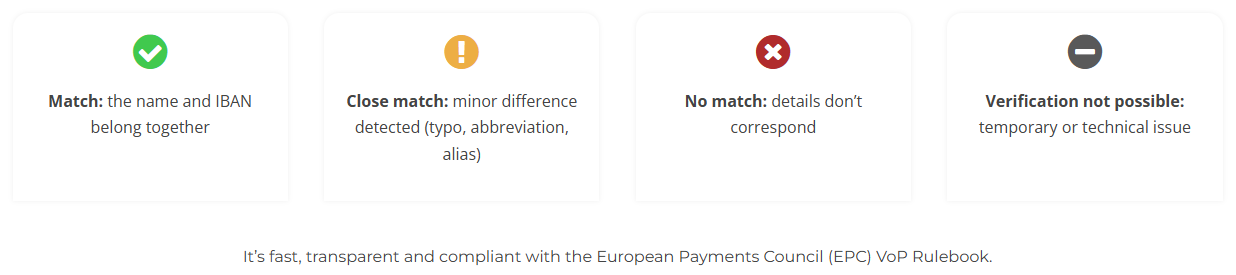
Each response includes:
- Timestamp for audit trails and a Unique identifier for tracking (you can find these in the headers of the request:
request-idanddateproperty respectively):
➜  ~ curl -i  --request POST \
     --url https://test.digiteal.eu/api/v1/ibanAccountHolderVerification \
     --header 'accept: application/json' \
     --header 'Authorization: Basic dGVzdHVzZXI6dGVzdHBhc3MxMjM=' \
     --header 'content-type: application/json' \
     --data '
{
  "iban": "BE03130000000184",
  "name": "John Doe"
}
'
HTTP/2 200
date: Thu, 30 Apr 2026 12:26:50 GMT
content-type: application/json
content-length: 87
request-id: 025bbbb1-69b9-4ee9-a953-f834b5dfdbee
x-content-type-options: nosniff
x-xss-protection: 0
cache-control: no-cache, no-store, max-age=0, must-revalidate
pragma: no-cache
expires: 0
x-frame-options: DENY
strict-transport-security: max-age=60

{"vopMatchResult":{"result":"NO_MATCH"},"bank":{"bic":"DIGEBEB2","name":"Digiteal SA"}}% - Bank name and BIC of the verifying institution
Integration Points
VoP can be integrated at various stages of your payment lifecycle:
1. During Onboarding or Data Capture
Validate account ownership immediately when customers, suppliers, or beneficiaries provide their IBAN. This prevents incorrect or fraudulent data from entering your systems.
2. Before Payment Initiation
Execute a final verification before releasing funds, especially critical for:
- High-value payments
- Bulk payment runs
- Updates to existing beneficiary details
3. As a Regulatory Control Layer
- Regulated entities: Automatic execution before instant payments
- Non-regulated entities: Voluntary adoption of bank-grade verification standards
4. Within Automated Decision Flows
Build intelligent workflows based on VoP responses:
MATCH→ Proceed automaticallyCLOSE_MATCH→ Request confirmation or apply internal rulesNO_MATCH→ Block payment or trigger manual review
Use Cases
SEPA Direct Debit Mandate Verification
Verify in real-time that the provided IBAN belongs to the customer creating a SEPA mandate. The verification runs silently in the background without disrupting the user experience.
Customer and Supplier Onboarding
Confirm IBAN ownership during onboarding or when payment details are updated. This reduces fraud risk and avoids costly corrections later.
Beneficiary Verification for Payouts
Ensure IBANs belong to intended beneficiaries before executing:
- Refunds
- Payroll
- Insurance claims
- Loan disbursements
- Compensation payments
- Other allocations
Technical integration
Getting Started
- Base URL:
https://app.digiteal.eu/api/v1 - Sandbox: Test environment available for integration testing
- Full Documentation: API Reference
Authentication
The Digiteal VoP API uses HTTP Basic Authentication. You'll receive API credentials (username and password) when you sign up for the service.
How Basic Auth Works
- Combine credentials: Join your username and password with a colon:
username:password - Base64 encode: Convert the combined string to Base64
- Add to header: Include the encoded string in the
Authorizationheader with theBasicprefix
Authentication Examples
Using curl with credentials
# Direct credential usage (curl handles the encoding)
curl --request POST \
     --url https://app.digiteal.eu/api/v1/ibanAccountHolderVerification \
     --user 'your-username:your-password' \
     --header 'accept: application/json' \
     --header 'content-type: application/json' \
     --data '{
       "iban": "BE03130000000184",
       "name": "Digiteal SA"
     }'
Using pre-encoded Authorization header
# Manual header construction
# Example: username="testuser", password="testpass123"
# Base64("testuser:testpass123") = "dGVzdHVzZXI6dGVzdHBhc3MxMjM="

curl --request POST \
     --url https://app.digiteal.eu/api/v1/ibanAccountHolderVerification \
     --header 'Authorization: Basic dGVzdHVzZXI6dGVzdHBhc3MxMjM=' \
     --header 'accept: application/json' \
     --header 'content-type: application/json' \
     --data '{
       "iban": "BE03130000000184",
       "name": "Digiteal SA"
     }'
Programming language examples
Python
import requests
import base64

username = "your-username"
password = "your-password"

# Option 1: Let requests handle it
response = requests.post(
    "https://app.digiteal.eu/api/v1/ibanAccountHolderVerification",
    auth=(username, password),
    json={
        "iban": "BE03130000000184",
        "name": "Digiteal SA"
    }
)

# Option 2: Manual header construction
credentials = f"USERNAME:{password}"
encoded_credentials = base64.b64encode(credentials.encode()).decode()
headers = {
    "Authorization": f"Basic {encoded_credentials}",
    "Content-Type": "application/json"
}
JavaScript (Node.js)
// Option 1: Using axios with auth parameter
const axios = require('axios');

const response = await axios.post(
  'https://app.digiteal.eu/api/v1/ibanAccountHolderVerification',
  {
    iban: 'BE03130000000184',
    name: 'Digiteal SA'
  },
  {
    auth: {
      username: 'your-username',
      password: 'your-password'
    }
  }
);

// Option 2: Manual header construction
const credentials = Buffer.from('your-username:your-password').toString('base64');
const headers = {
  'Authorization': `Basic ${credentials}`,
  'Content-Type': 'application/json'
};
Verification Methods
1. Name-Based Verification (Recommended)
Verify account ownership using the account holder's name.
Match Example
This example may lead to confusion since the name of the
bankAccountHolder(the entity you're doing the verification on) is the same as the name of thebank(the bank performing the verification)
# Request
curl --request POST \
     --url https://app.digiteal.eu/api/v1/ibanAccountHolderVerification \
     --header 'Authorization: Basic dGVzdHVzZXI6dGVzdHBhc3MxMjM=' \
     --header 'accept: application/json' \
     --header 'content-type: application/json' \
     --data '{
       "iban": "BE03130000000184",
       "name": "Digiteal SA"
     }'

# Response
{
   "bank": {
      "bic": "DIGEBEB2",
      "name": "DIGITEAL SA"
   },
   "bankAccountHolder": {
      "name": "Digiteal SA"
   },
   "vopMatchResult": {
      "result": "MATCH"
   }
}
Close Match Examples
A CLOSE_MATCH occurs when the responding bank detects minor, non-critical differences between the provided name and their internal records. The API strictly passes back the name exactly as it is stored or processed on the bank's end, which may reveal how their systems alter the string.
Common triggers for a CLOSE_MATCH include:
- Truncation: The bank's legacy system imposes a character limit and cuts off the end of a company or individual name.
- Character Normalization: Regional characters or umlauts (like
ö,ü,ß) are mapped to standard alphabet equivalents (e.g.,ooroe,uorue,ss). - Missing Suffixes: A legal entity suffix (like "SA", "Ltd", "GmbH") is missing in the request but present in the bank's database (or vice versa).
Scenario A: System Truncation and Character Normalization In this example, the bank's system replaces the umlaut "ö" with an "o" and truncates the final "H" from "GmbH" due to string length limits.
# Request (Full name with Umlaut)
curl --request POST \
     --url https://app.digiteal.eu/api/v1/ibanAccountHolderVerification \
     --header 'accept: application/json' \
     --header 'content-type: application/json' \
     --data '{
       "iban": "DE69202208000051473086",
       "name": "Foobar / Gönix Inc GmbH"
     }'

# Response (Normalized 'o' and truncated "Gmb")
{
   "bank": {
      "bic": "SXPYDEHHXXX",
      "name": "Banking Circle - German Branch"
   },
   "bankAccountHolder": {
      "name": "Foobar / Gönix Inc Gmb"
   },
   "vopMatchResult": {
      "result": "CLOSE_MATCH"
   }
}
Scenario B: Regional Character Substitution In this example, the German letter "ß" (Eszett) is normalized to "ss" by the receiving bank.
# Request (Using Eszett 'ß')
curl --request POST \
     --url https://app.digiteal.eu/api/v1/ibanAccountHolderVerification \
     --header 'accept: application/json' \
     --header 'content-type: application/json' \
     --data '{
       "iban": "DE12345678901234576109",
       "name": "Groß Berlin GmbH"
     }'

# Response (Replaced with 'ss')
{
   "bank": {
      "bic": "GENODEF1BER",
      "name": "Berliner Volksbank"
   },
   "bankAccountHolder": {
      "name": "Gross Berlin GmbH"
   },
   "vopMatchResult": {
      "result": "CLOSE_MATCH"
   }
}
Scenario C: Missing Suffixes In this example, the verification name is missing the official legal suffix recorded by the bank.
This example may lead to confusion since the name of the
bankAccountHolder(the entity you're doing the verification on) is the same as the name of thebank(the bank performing the verification)
# Request (Missing "SA" suffix)
curl --request POST \
     --url https://app.digiteal.eu/api/v1/ibanAccountHolderVerification \
     --header 'Authorization: Basic dGVzdHVzZXI6dGVzdHBhc3MxMjM=' \
     --header 'accept: application/json' \
     --header 'content-type: application/json' \
     --data '{
       "iban": "BE03130000000184",
       "name": "Digiteal"
     }'

# Response
{
   "bank": {
      "bic": "DIGEBEB2",
      "name": "DIGITEAL SA"
   },
   "bankAccountHolder": {
      "name": "Digiteal SA"
   },
   "vopMatchResult": {
      "result": "CLOSE_MATCH"
   }
}
No Match Example
# Request
curl --request POST \
     --url https://app.digiteal.eu/api/v1/ibanAccountHolderVerification \
     --header 'Authorization: Basic dGVzdHVzZXI6dGVzdHBhc3MxMjM=' \
     --header 'accept: application/json' \
     --header 'content-type: application/json' \
     --data '{
       "iban": "BE03130000000184",
       "name": "John Doe"
     }'

# Response
{
   "bank": {
      "bic": "DIGEBEB2",
      "name": "DIGITEAL SA"
   },
   "vopMatchResult": {
      "result": "NO_MATCH"
   }
}No match because of middle names scenario
It is possible that adding middle names (by taking the full name of the user from an official document f.e.) may result in an unwarranted NO_MATCHIt is recommended by the EPC to only you use the legal first name and last name. If you're interested in the full matching logic implemented by the banks, you can look at the fulll recommended matching process published by the EPC here.
Not applicable Example
curl --request POST \
     --url https://test.digiteal.eu/api/v1/ibanAccountHolderVerification \
     --header 'accept: application/json' \
     --header 'Authorization: Basic dGVzdHVzZXI6dGVzdHBhc3MxMjM=' \
     --header 'content-type: application/json' \
     --data '
{
  "iban": "FR7630002005701234567890158",
  "name": "Jean Dupont"
}
'
{"vopMatchResult":{"result":"NO_AP"},"bank":{"bic":"CRLYFRPP","name":"CREDIT LYONNAIS"}}
2. Identifier-Based Verification
Note: Identifier-based verification shows varying results and consistency across different banks. We recommend using name-based verification when possible.
Verify account ownership using standardized identifiers.
Supported Identifier Types
| Type | Description | Example |
|---|---|---|
LEI | Legal Entity Identifier | 9845000A44AB9CA60605 |
BIC | Bank Identifier Code | DIGEBEB2 |
TXID | Tax Identification Number (VAT) | BE0630675588 |
CINC | Certificate of Incorporation Number | Company registration number |
DUNS | Data Universal Numbering System | D-U-N-S number |
SREN | SIREN (France) | French business ID |
SRET | SIRET (France) | French establishment ID |
View all supported identifier types →
VAT Verification Example
# Request
curl --request POST \
     --url https://app.digiteal.eu/api/v1/ibanAccountHolderVerification \
     --header 'Authorization: Basic dGVzdHVzZXI6dGVzdHBhc3MxMjM=' \
     --header 'accept: application/json' \
     --header 'content-type: application/json' \
     --data '{
       "identifier": {
         "type": "TXID",
         "value": "BE0630675588"
       },
       "iban": "BE03130000000184"
     }'

# Response
{
  "vopMatchResult": {
    "result": "MATCH"
  },
  "bankAccountHolder": {
    "identifier": {
      "type": "TXID",
      "value": "BE0630675588"
    }
  },
  "bank": {
    "bic": "DIGEBEB2",
    "name": "DIGITEAL SA"
  }
}
Response Codes
| Result | Description | Recommended Action |
|---|---|---|
MATCH | Perfect match between provided data and account holder | Proceed with payment |
CLOSE_MATCH | Minor differences detected (e.g., missing suffix, typos) | Review differences or request confirmation |
NO_MATCH | Significant mismatch | Block payment or require manual verification |
NO_AP | Verification not available for this account | Apply alternative verification methods |
ERROR | Technical or processing error | Retry or contact support |
Error Handling
If authentication fails, you'll receive a 401 Unauthorized response:
{
  "error": "Unauthorized",
  "message": "Invalid credentials"
}
Common authentication issues:
- Incorrect username or password
- Missing Authorization header
- Incorrectly formatted Authorization header
- Expired or revoked credentials
Next Steps
- Request API Access: Contact our sales team to get your API credentials
- Review API Documentation: Explore the full API reference
- Test in Sandbox: Use our test environment to simulate various scenarios
- Integrate: Add VoP to your payment flows
- Monitor: Track verification results and optimize your workflows
Support
- Technical Documentation: doc.digiteal.eu
- Support Email: [email protected]
- Sales Inquiries: [email protected]
Updated 2 months ago
What’s Next
Link to the API reference: https://doc.digiteal.eu/reference/ibanaccountholderverification