
Access Point Service
Send and receive documents through the Peppol network
Peppol Access Point
Send and receive documents through the Peppol network
I am a...
- 📋 Business user learning about Peppol
- 👩💻 Developer ready to integrate
- 🤔 Decision maker evaluating our service
- 🏛️ Learning about mandatory e-invoicing requirements
Our Peppol Service
What We Provide vs. What We Don't
| ✅ What We Provide | ❌ What We Don't Provide |
|---|---|
| Peppol network access via API | Document transformation |
| UBL 2.1 XML processing (OpenPeppol BIS Billing v3) | File format conversion |
| Webhook-based document delivery | User dashboard/portal |
| Certified Peppol Access Point | Document storage |
| API-only integration | PDF generation |
Service Overview
- API-Only Service: We provide programmatic access to the Peppol network - no web dashboard
- Document Format: We accept only UBL v2.1 XML files conformant to OpenPeppol BIS Billing v3 ruleset
- No Transformation: We don't convert files between formats - your documents must be Peppol-ready
- Webhook Delivery: All inbound documents are delivered via webhooks (no polling endpoints)
Why These Restrictions Benefit You
🔄 Vendor Independence
By restricting to only UBL 2.1 and OpenPeppol BIS Billing 3.0, a large part of the business process (i.e. generating the invoices) remains your responsibility. This makes it easier for you to switch access points without being locked into proprietary formats or processes.
📋 Compliance & Control
These standardized documents are exactly what you need to present to authorities for mandatory e-invoicing. It's beneficial that you create and store them yourself, rather than having them potentially locked inside a platform where you might lose control or access.
⚡ Simplified Integration
Our focused approach means cleaner APIs, predictable behavior, and fewer edge cases to handle in your integration.
Access & Pricing
| Service Level | Access | Requirements |
|---|---|---|
| Public Endpoints | Free | No contract required |
| Peppol Services | Paid | Signed sales agreement required |
Ready to get started? Contact our sales team to become a Peppol integrator.
What is Peppol ?
Peppol enables participants to exchange standards-based electronic documents over the Peppol network. A general business overview of Peppol is available in this blog post.
Traditional document exchange services are provided by integrators that will send the document based on specific and expensive to operate point-to-point connections. Peppol is based on a 4 corner model where the sender has a sending access point and the receiver has a receiving access point. The communication between the sender and the receiver is governed by Peppol standards which removes the cost of the point-to-point connections. This way, everyone can be connected to everyone and all the participants can choose a commodity access point.
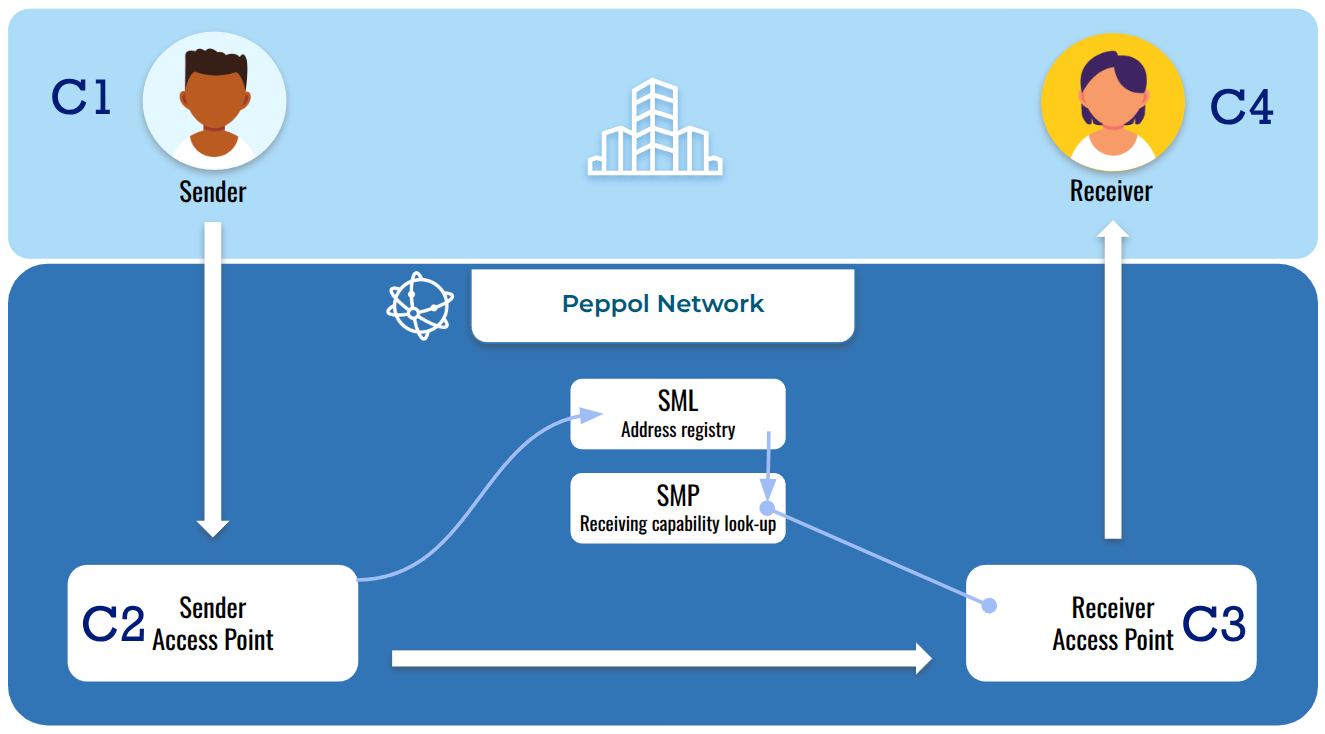
Peppol 4 corner model
Peppol is in use in 32 countries in Europe plus Canada, Singapore and USA with Peppol Authorities placed in 12 countries.
Peppol is based on three major pillars:
- the network (Peppol eDelivery Network)
- the document specifications (Peppol Business Interoperability Specifications also called Peppol BIS)
- the legal framework that defines the network governance (Peppol Transport Infrastructure Agreements also called the Peppol TIA)
Digiteal is a Peppol Access Point certified by the Belgian Peppol Authority, operated by the Belgian government. The Belgian Peppol Authority manages the list of all their certified Peppol Access Points.
Peppol is often used for e-invoicing. The whole process from the invoice preparation to its full payment by the recipient is explained in this video (see also the French and Dutch versions).
For more information about Peppol, the country profiles and the access points can be found on the official Peppol website.
Mandatory e-invoicing
Belgium
In Belgium, B2G e-invoicing is mandatory in Flanders since 2020. This has been extended to the whole country in 2022 and is enforced through the call for tenders issued by the public authorities. Since March 2024, all public procurement contracts for a total amount of minimum 3K€ must include the mention that the related invoices must be sent to the public institution through Peppol.
B2B invoicing through Peppol will become mandatory for all companies on 01/01/2026 (see decision on 29/09/2023 and the decree approved on 01/02/2024 in the Parliament. This concerns all Belgian VAT registered companies for all their invoices and credit notes sent to other Belgian VAT registered companies (see the details of the B2B obligation. Belgium has decided to take a staged approach. The next steps will probably be e-reporting (scheduled in the governemental agreement for 2028) and then the CTC as mandated by the European Commission.
Luxembourg
In Luxembourg, B2G e-invoicing through Peppol is mandatory as stated in the law of 13/12/2021. This obligation has been enforced gradually to all companies. The last step of the obligation for the small companies had 18/03/2023 as deadline.
For B2B transactions, the timeline is now officially set. On 17 July 2026, the Luxembourg government approved a draft law extending mandatory e-invoicing beyond B2G to cover domestic B2B transactions, which applies when both the supplier and the client are based in Luxembourg. Although the law still needs parliamentary approval, the direction and timeline are clear.
According to the Chamber of Commerce, the B2B rollout will happen in stages:
- 1 January 2028: All companies must be able to receive compliant e-invoices.
- 1 July 2028: Large and medium-sized companies must issue their B2B invoices electronically.
- 1 January 2029: The obligation to issue e-invoices extends to all remaining companies, including small and micro businesses.
Netherlands
In the Netherlands, e-invoicing is largely driven by the Nederlandse Peppolautoriteit (NPa) and EU directives.
B2G e-invoicing is already fully mandatory. Central government agencies have required suppliers to submit structured electronic invoices since January 1, 2017. This mandate was extended to all sub-central public authorities (including municipalities, provinces, and water boards) on April 18, 2019. Invoices to the government must be exchanged through the Peppol network or directly via the government's Digipoort infrastructure. The preferred standard is Peppol BIS 3.0 or the localized NLCIUS (SI-UBL) (both are supported by Digiteal).
B2B e-invoicing is currently voluntary but widely adopted. However, the Netherlands is preparing for sweeping changes driven by the EU's VAT in the Digital Age (ViDA) initiative (see EU countries section)
Germany
In Germany, e-invoicing is governed by European standards and the Growth Opportunities Act (Wachstumschancengesetz).
B2G e-invoicing is already highly regulated. Public contracting authorities are required to accept and process electronic invoices that comply with the European Standard for eInvoicing (EN 16931).
B2B e-invoicing is currently undergoing a phased mandatory rollout for domestic transactions between German-established businesses. The timeline separates the duty to receive e-invoices from the duty to issue them:
- January 1, 2025: All businesses in scope must be capable of receiving and processing structured e-invoices for domestic B2B transactions.
- January 1, 2027: Businesses with an annual turnover exceeding €800,000 must start issuing structured e-invoices for domestic B2B transactions.
- January 1, 2028: The obligation to issue structured e-invoices extends to all German businesses, regardless of turnover.
The accepted structured formats include pure XML like XRechnung, BIS Billing V3 and hybrid formats like ZUGFeRD 2.0.1+ (PDF + embedded XML). We currently only support XRechnung and BIS Billing V3.
France
In France, B2G e-invoicing is already applicable in France through the Chorus Pro portal. UBL, FactureX and CENBII can be used as exchange format. Chorus Pro provides the necessary gateway to interface the French System with Peppol. This integration is however performed in a way that does not respect the Peppol approach. The French administrations are not present in the Peppol registry and they are only addressed through the Chorus Pro endpoint acting as a black-box.
B2B e-invoicing was made mandatory in the article 26 of the finance law revision of 2022. However, the initial timing of the obligations was too ambitious and the obligations have been delayed on 28/07/2023. The current calendar for the application of these obligations is:
| Capability | Mandatory starting on |
|---|---|
| Receive electronic invoices | 01/09/2026 |
| Send electronic invoices (large companies) | 01/09/2026 |
| Send electronic invoices (SMEs) | 01/09/2027 |
n Digiteal, we believe that the French specific system is too ambitious and not standard enough to succeed. We are not registered as a PDP candidate.
Of course, the companies can choose to start receiving and sending electronic invoices sooner if they want. They can also be directly connected through Peppol for maximum interoperability.
EU Countries
An overview of the e-invoicing obligations in all the EU countries is provided in the e-invoicing documentation of the European Commission.
In an EU Commission update, the EC pushes to set up a standard for reporting and mandate obligatory eInvoicing to improve VAT collection and transparency in the EU. They call this the Digital Reporting Requirements which is a type of federated Continuous Tax Control (CTC) for the EU Digital Single Market. This initiative is called ViDA (VAT in the Digital Age).
This involves all the EU countries (not only the ones that use PEPPOL today) and leads to a higher requirement for interoperability. For example, France must also comply with this through more interoperability with Peppol as described in this [update of the French DCTCE](https://openpeppol.atlassian.net/wiki/download/attachments/2963570689/2022.11.03%20F2F_DCTCE%20-%20France%20PoC,%20followed%20by%20CTC%20Q%26A.pdf?api=v2. All countries of the EU must support interoperable cross-border e-reporting by 2030 (except Italy that has until 2035 to comply because they already had a running clearing system before ViDA was decided upon). This will lead to a much wider adoption of Peppol as the perfect solution to support this interoperability and the Decentralized Continutous Tax Control (D-CTC) enabling e-reporting for the whole European Union.
Technical Integration
Getting Started with the API
Whether you are an ERP, CRM, an accounting package or a company wishing to send/receive invoices from/to Peppol; in order to send or receive invoices through the Digiteal Access Point, you must be granted the role of Peppol integrator within Digiteal. To become Peppol integrator contact the Digiteal's sales team.
Understanding the Document Flow
Outbound Documents (Sending)
- You send UBL 2.1 XML to our API
- We validate and deliver to the recipient's access point
- You receive delivery confirmations via webhooks
Inbound Documents (Receiving)
You will receive inbound documents via webhooks (url or email)
We don't provide polling endpoints. All received documents are delivered via webhooks. See the Receive a Document section
Peppol identifiers
To identify participants in the Peppol network, identifiers are used. The identifiers are composed of an identifier type and an identifier value.
They are assembled as {type}:{value}. For example, type 0208 corresponds to the company number in Belgium and type 9925 corresponds to a Belgian VAT number. The Peppol identifiers of Digiteal using these types are therefore 0208:0630675588 and 9925:be0630675588.
The list of all the identifier types that can be used is available in the Peppol codelists.
When registering a company and to ensure maximum reachability, it is better to register the company for all the possible company identifiers associated to it. For example, in Belgium, the mandatory identifier type is 0208. So, when registering a company, we advise you to register for both the 0208 and the 9925 types.
Often, you will want to derive the various PEPPOL identifiers from a company VAT number. Here is a little recipe that will enable you to do this:
Belgium Identifiers
When addressing participants in Belgium, ensuring the correct scheme ID is critical for compliance and successful routing on the Peppol network:
0208(CBE/KBO Enterprise Number): This is the primary and mandatory identifier scheme for Belgian businesses. It is a 10-digit number issued by the Crossroads Bank for Enterprises (e.g.,0417497106without spaces or dots). Service providers must ensure domestic Belgian participants are registered using this scheme to guarantee universal software support and avoid lookup failures.9925(Belgian VAT Number): This scheme is used for the Belgian VAT number, typically formatted with a lowercase prefix (e.g.,be0123456789). While the network supports it, it is generally treated as an alternative or secondary identifier in Belgium, primarily useful for foreign companies registered for Belgian VAT that lack a domestic CBE number.
Luxembourg Identifiers
In Luxembourg, participant identification on Peppol uses a more consolidated approach, heavily reliant on a single list code for local entities:
9938(Luxembourg VAT & Matricule): In Luxembourg, the scheme code9938(which officially corresponds to the LU:VAT scheme in Peppol) is commonly used for two distinct types of identifiers. You will use this scheme both for standard Luxembourg VAT numbers (starting with LU followed by 8 digits) and for the 13-digit identity number from the trade and companies register (matricule/RCS).
Netherlands Identifiers
In the Netherlands, businesses and government bodies use multiple identifiers that serve different purposes. For Peppol e-invoicing, three primary scheme IDs dictate how you identify Dutch participants:
0106(KVK Number): This is the Dutch Chamber of Commerce (Kamer van Koophandel) number. It is exactly 8 digits long (e.g.,12345678). This is the default and most commonly encountered Peppol identifier for commercial businesses in the Netherlands.0190(OIN Number): The Organization Identification Number (Organisatie-identificatienummer). This 20-digit number is the mandatory identifier for Dutch government entities and public authorities.9944(Dutch VAT Number): The scheme ID for Dutch BTW-nummers (VAT numbers).
When registering a commercial Dutch company, and to ensure maximum reachability on the network, we advise registering the participant for both the 0106 (KVK) and 9944 (VAT) types. Government entities should always be addressed via their 0190 (OIN) identifier.
Germany Identifiers
When integrating for the German market, there are specific scheme IDs you must use to identify participants on the Peppol network:
0204(KoSIT / Leitweg-ID): This is the mandatory routing identifier used for all public sector and government entities in Germany (B2G). Ensuring this ID is correctly populated is critical for successful document delivery to government access points.9930(German VAT Number): The scheme ID used to identify German commercial businesses via their USt-IdNr. For example, a German company with VAT number DE123456789 would have the Peppol ID9930:DE123456789.
Managing Peppol Business Cards
To improve the visibility of participants on the Peppol network, you can now programmatically update your participant's Peppol Business Card. This information is public and helps other participants identify relevant company details (such as website, contact info, and trade names) directly within the Peppol Directory.
You can find the endpoint details here
Address Registry and Peppol directory
The entities that are able to receive documents from the Peppol network are called Peppol participants. They are registered in a technical address registry called the SML (in PROD) and the SMK (in TEST). They operate through a DNS as explained here.
These registries redirect to SMPs that define the capabilities of each Peppol participant. To browse this technical registry manually, please use the participant query tool provided by Philip Helger.
There is also a Peppol directory that enables the general public to find the capabilities of the Peppol participants and their contact information.
To find if a company is able to receive a specific document type, you can use our APIs:
- You can call Digiteal API Get supported document types by participant for legacy enum-based checks.
- [NEW] You can call the Get supported documents by participant - generic format endpoint to retrieve the list of all supported document types for a participant dynamically.
- [NEW] You can also use the public endpoint Get detailed participant information - generic format to retrieve both the generic supported document types and the participant's business card.
Integration Architecture
SaaS Integration
Integrating Peppol APIs of Digiteal from a SaaS solution is straightforward:
- The Sender using your SaaS solution wishes to send a document through Peppol. You can directly use the API to send it.
- You received a document for one your registered participant. You can inform your customer that will see the document from your Saas solution.
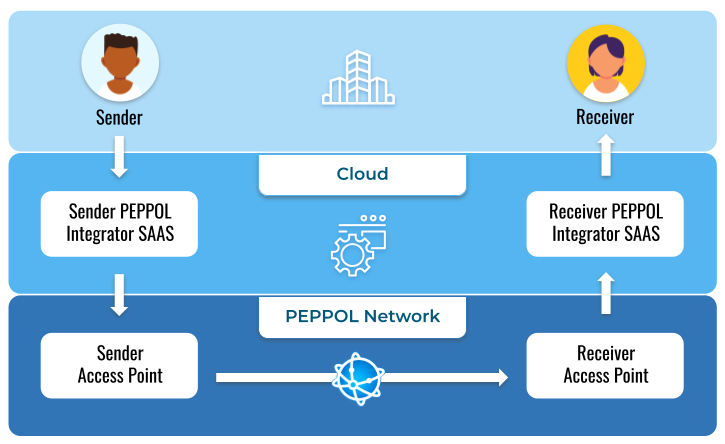
On-Premises Integration
Integrating Peppol APIs of Digiteal from an on-premises solution requires a gateway layer for the following reasons:
- The on-premises Sender software might not be up-to-date and it might not be sending valid Peppol documents. The Sender Peppol Integrator Gateway can fix the outgoing documents so that they can be valid according to the latest specifications.
- The on-premises Sender software cannot contain the credentials of the Integrator that are used to connect to the Digiteal Peppol Access Point.
- All documents sent to the Integrator, for all the registered participants, will be sent through webhooks to a single URL. This reception service will be part of the Receiver Peppol Integrator Gateway. The documents will then be forwarded to the on-premises Receiver software.
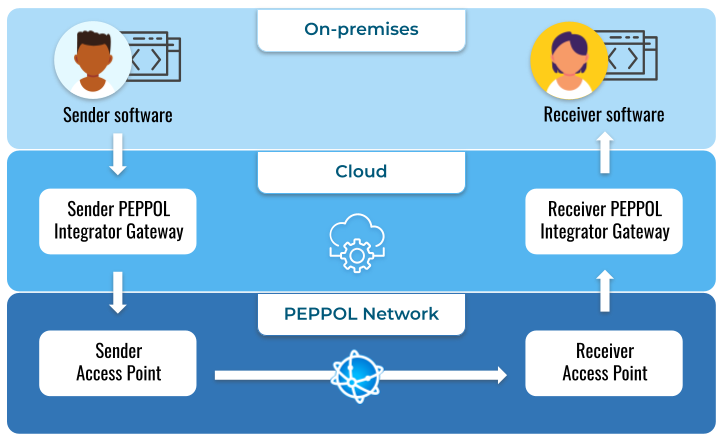
Document types
The lingua franca on Peppol is UBL. The documents exchanged on Peppol include credit notes, orders, advance shipping notes, invoices, catalogues, message level responses, etc.
Supporting 33 Document Types (Generic Endpoints BETA)
To scale our service and support over 30 different document types, Digiteal now supports a generic document classification system. Instead of relying on predefined enum values (such as INVOICE or CREDIT_NOTE), you can now dynamically specify any document type by providing two core identifiers:
documentTypeIdentifier: The document type identifier, structured in a<scheme>::<value>format (e.g.,busdox-docid-qns::urn:oasis:names:specification:ubl:schema:xsd:Invoice-2::Invoice##urn:cen.eu:en16931:2017#compliant#urn:fdc:peppol.eu:2017:poacc:billing:3.0::2.1).processIdentifier: The process identifier, structured in a<scheme>::<value>format (e.g.,cenbii-procid-ubl::urn:fdc:peppol.eu:2017:poacc:billing:01:1.0).
You can check which document types our Access Point fully supports by using the Get supported document types - generic format public endpoint.
Sending and receiving through generic document system (this list is "send only" for the legacy system)
| Profile name | Document type identifier | Process identifier |
|---|---|---|
| Peppol BIS Billing UBL Invoice V3 | busdox-docid-qns::urn:oasis:names:specification:ubl:schema:xsd:Invoice-2::Invoice##urn:cen.eu:en16931:2017#compliant#urn:fdc:peppol.eu:2017:poacc:billing:3.0::2.1 | cenbii-procid-ubl::urn:fdc:peppol.eu:2017:poacc:billing:01:1.0 |
| Peppol BIS Billing UBL Invoice V3 | busdox-docid-qns::urn:oasis:names:specification:ubl:schema:xsd:Invoice-2::Invoice##urn:cen.eu:en16931:2017#compliant#urn:fdc:peppol.eu:2017:poacc:billing:3.0::2.1 | cenbii-procid-ubl::urn:peppol:bis:billing_with_response |
| Peppol BIS Billing UBL Credit Note V3 | busdox-docid-qns::urn:oasis:names:specification:ubl:schema:xsd:CreditNote-2::CreditNote##urn:cen.eu:en16931:2017#compliant#urn:fdc:peppol.eu:2017:poacc:billing:3.0::2.1 | cenbii-procid-ubl::urn:fdc:peppol.eu:2017:poacc:billing:01:1.0 |
| Peppol BIS Billing UBL Credit Note V3 | busdox-docid-qns::urn:oasis:names:specification:ubl:schema:xsd:CreditNote-2::CreditNote##urn:cen.eu:en16931:2017#compliant#urn:fdc:peppol.eu:2017:poacc:billing:3.0::2.1 | cenbii-procid-ubl::urn:peppol:bis:billing_with_response |
| Peppol BIS Billing CII Invoice V3 | busdox-docid-qns::urn:un:unece:uncefact:data:standard:CrossIndustryInvoice:100::CrossIndustryInvoice##urn:cen.eu:en16931:2017#compliant#urn:fdc:peppol.eu:2017:poacc:billing:3.0::D16B | cenbii-procid-ubl::urn:fdc:peppol.eu:2017:poacc:billing:01:1.0 |
| Peppol Catalogue transaction 3.0 | busdox-docid-qns::urn:oasis:names:specification:ubl:schema:xsd:Catalogue-2::Catalogue##urn:fdc:peppol.eu:poacc:trns:catalogue:3::2.1 | cenbii-procid-ubl::urn:fdc:peppol.eu:poacc:bis:catalogue_only:3 |
| Peppol Catalogue transaction 3.0 | busdox-docid-qns::urn:oasis:names:specification:ubl:schema:xsd:Catalogue-2::Catalogue##urn:fdc:peppol.eu:poacc:trns:catalogue:3::2.1 | cenbii-procid-ubl::urn:fdc:peppol.eu:poacc:bis:catalogue_wo_response:3 |
| Peppol Catalogue Response transaction 3.0 | busdox-docid-qns::urn:oasis:names:specification:ubl:schema:xsd:ApplicationResponse-2::ApplicationResponse##urn:fdc:peppol.eu:poacc:trns:catalogue_response:3::2.1 | cenbii-procid-ubl::urn:fdc:peppol.eu:poacc:bis:catalogue_only:3 |
| Peppol Order transaction 3.0 | busdox-docid-qns::urn:oasis:names:specification:ubl:schema:xsd:Order-2::Order##urn:fdc:peppol.eu:poacc:trns:order:3::2.1 | cenbii-procid-ubl::urn:fdc:peppol.eu:poacc:bis:ordering:3 |
| Peppol Order transaction 3.0 | busdox-docid-qns::urn:oasis:names:specification:ubl:schema:xsd:Order-2::Order##urn:fdc:peppol.eu:poacc:trns:order:3::2.1 | cenbii-procid-ubl::urn:fdc:peppol.eu:poacc:bis:order_only:3 |
| Peppol Order transaction 3.0 | busdox-docid-qns::urn:oasis:names:specification:ubl:schema:xsd:Order-2::Order##urn:fdc:peppol.eu:poacc:trns:order:3::2.1 | cenbii-procid-ubl::urn:fdc:peppol.eu:poacc:bis:advanced_ordering:3 |
| Peppol Invoice Response transaction 3.0 | busdox-docid-qns::urn:oasis:names:specification:ubl:schema:xsd:ApplicationResponse-2::ApplicationResponse##urn:fdc:peppol.eu:poacc:trns:invoice_response:3::2.1 | cenbii-procid-ubl::urn:fdc:peppol.eu:poacc:bis:invoice_response:3 |
| Peppol Punch Out transaction 3.0 | busdox-docid-qns::urn:oasis:names:specification:ubl:schema:xsd:Catalogue-2::Catalogue##urn:fdc:peppol.eu:poacc:trns:punch_out:3::2.1 | cenbii-procid-ubl::urn:fdc:peppol.eu:poacc:bis:punch_out:3 |
| Peppol Order Response transaction 3.0 | busdox-docid-qns::urn:oasis:names:specification:ubl:schema:xsd:OrderResponse-2::OrderResponse##urn:fdc:peppol.eu:poacc:trns:order_response:3::2.1 | cenbii-procid-ubl::urn:fdc:peppol.eu:poacc:bis:ordering:3 |
| Peppol Despatch Advice transaction 3.0 | busdox-docid-qns::urn:oasis:names:specification:ubl:schema:xsd:DespatchAdvice-2::DespatchAdvice##urn:fdc:peppol.eu:poacc:trns:despatch_advice:3::2.1 | cenbii-procid-ubl::urn:fdc:peppol.eu:poacc:bis:despatch_advice:3 |
| Peppol Order Agreement transaction 3.0 | busdox-docid-qns::urn:oasis:names:specification:ubl:schema:xsd:OrderResponse-2::OrderResponse##urn:fdc:peppol.eu:poacc:trns:order_agreement:3::2.1 | cenbii-procid-ubl::urn:fdc:peppol.eu:poacc:bis:order_agreement:3 |
| Peppol Message Level Response transaction 3.0 | busdox-docid-qns::urn:oasis:names:specification:ubl:schema:xsd:ApplicationResponse-2::ApplicationResponse##urn:fdc:peppol.eu:poacc:trns:mlr:3::2.1 | cenbii-procid-ubl::urn:fdc:peppol.eu:poacc:bis:mlr:3 |
| SI-UBL 2.0 Invoice | busdox-docid-qns::urn:oasis:names:specification:ubl:schema:xsd:Invoice-2::Invoice##urn:cen.eu:en16931:2017#compliant#urn:fdc:nen.nl:nlcius:v1.0::2.1 | cenbii-procid-ubl::urn:fdc:peppol.eu:2017:poacc:billing:01:1.0 |
| SI-UBL 2.0 Credit Note | busdox-docid-qns::urn:oasis:names:specification:ubl:schema:xsd:CreditNote-2::CreditNote##urn:cen.eu:en16931:2017#compliant#urn:fdc:nen.nl:nlcius:v1.0::2.1 | cenbii-procid-ubl::urn:fdc:peppol.eu:2017:poacc:billing:01:1.0 |
| SG Peppol BIS Billing 3.0 Invoice | busdox-docid-qns::urn:oasis:names:specification:ubl:schema:xsd:Invoice-2::Invoice##urn:cen.eu:en16931:2017#conformant#urn:fdc:peppol.eu:2017:poacc:billing:international:sg:3.0::2.1 | cenbii-procid-ubl::urn:fdc:peppol.eu:2017:poacc:billing:01:1.0 |
| SG Peppol BIS Billing 3.0 Credit Note | busdox-docid-qns::urn:oasis:names:specification:ubl:schema:xsd:CreditNote-2::CreditNote##urn:cen.eu:en16931:2017#conformant#urn:fdc:peppol.eu:2017:poacc:billing:international:sg:3.0::2.1 | cenbii-procid-ubl::urn:fdc:peppol.eu:2017:poacc:billing:01:1.0 |
| SI-UBL 2.0 G-Account Extension | busdox-docid-qns::urn:oasis:names:specification:ubl:schema:xsd:Invoice-2::Invoice##urn:cen.eu:en16931:2017#compliant#urn:fdc:nen.nl:nlcius:v1.0#conformant#urn:fdc:nen.nl:gaccount:v1.0::2.1 | cenbii-procid-ubl::urn:fdc:peppol.eu:2017:poacc:billing:01:1.0 |
| SETU Invoice v2.2 | busdox-docid-qns::urn:oasis:names:specification:ubl:schema:xsd:Invoice-2::Invoice##urn:cen.eu:en16931:2017#compliant#urn:fdc:nen.nl:nlcius:v1.0#compliant#urn:fdc:setu.nl:invoice:v2.2::2.1 | cenbii-procid-ubl::urn:fdc:peppol.eu:2017:poacc:billing:01:1.0 |
| Peppol Order Change | busdox-docid-qns::urn:oasis:names:specification:ubl:schema:xsd:OrderChange-2::OrderChange##urn:fdc:peppol.eu:poacc:trns:order_change:3::2.3 | cenbii-procid-ubl::urn:fdc:peppol.eu:poacc:bis:advanced_ordering:3 |
| Peppol Order Cancellation | busdox-docid-qns::urn:oasis:names:specification:ubl:schema:xsd:OrderCancellation-2::OrderCancellation##urn:fdc:peppol.eu:poacc:trns:order_cancellation:3::2.3 | cenbii-procid-ubl::urn:fdc:peppol.eu:poacc:bis:advanced_ordering:3 |
| Peppol Order Response Advanced | busdox-docid-qns::urn:oasis:names:specification:ubl:schema:xsd:OrderResponse-2::OrderResponse##urn:fdc:peppol.eu:poacc:trns:order_response_advanced:3::2.3 | cenbii-procid-ubl::urn:fdc:peppol.eu:poacc:bis:advanced_ordering:3 |
| XRechnung UBL Invoice V3.0 | busdox-docid-qns::urn:oasis:names:specification:ubl:schema:xsd:Invoice-2::Invoice##urn:cen.eu:en16931:2017#compliant#urn:xeinkauf.de:kosit:xrechnung_3.0::2.1 | cenbii-procid-ubl::urn:fdc:peppol.eu:2017:poacc:billing:01:1.0 |
| XRechnung UBL Credit Note V3.0 | busdox-docid-qns::urn:oasis:names:specification:ubl:schema:xsd:CreditNote-2::CreditNote##urn:cen.eu:en16931:2017#compliant#urn:xeinkauf.de:kosit:xrechnung_3.0::2.1 | cenbii-procid-ubl::urn:fdc:peppol.eu:2017:poacc:billing:01:1.0 |
| XRechnung CII Invoice V3.0 | busdox-docid-qns::urn:un:unece:uncefact:data:standard:CrossIndustryInvoice:100::CrossIndustryInvoice##urn:cen.eu:en16931:2017#compliant#urn:xeinkauf.de:kosit:xrechnung_3.0::D16B | cenbii-procid-ubl::urn:fdc:peppol.eu:2017:poacc:billing:01:1.0 |
| XRechnung UBL Invoice V3.0 Extension | busdox-docid-qns::urn:oasis:names:specification:ubl:schema:xsd:Invoice-2::Invoice##urn:cen.eu:en16931:2017#compliant#urn:xeinkauf.de:kosit:xrechnung_3.0#conformant#urn:xeinkauf.de:kosit:extension:xrechnung_3.0::2.1 | cenbii-procid-ubl::urn:fdc:peppol.eu:2017:poacc:billing:01:1.0 |
| XRechnung CII Invoice V3.0 Extension | busdox-docid-qns::urn:un:unece:uncefact:data:standard:CrossIndustryInvoice:100::CrossIndustryInvoice##urn:cen.eu:en16931:2017#compliant#urn:xeinkauf.de:kosit:xrechnung_3.0#conformant#urn:xeinkauf.de:kosit:extension:xrechnung_3.0::D16B | cenbii-procid-ubl::urn:fdc:peppol.eu:2017:poacc:billing:01:1.0 |
| Peppol BIS Self-Billing UBL Invoice V3 | busdox-docid-qns::urn:oasis:names:specification:ubl:schema:xsd:Invoice-2::Invoice##urn:cen.eu:en16931:2017#compliant#urn:fdc:peppol.eu:2017:poacc:selfbilling:3.0::2.1 | cenbii-procid-ubl::urn:fdc:peppol.eu:2017:poacc:selfbilling:01:1.0 |
| Peppol BIS Self-Billing UBL Invoice V3 | busdox-docid-qns::urn:oasis:names:specification:ubl:schema:xsd:Invoice-2::Invoice##urn:cen.eu:en16931:2017#compliant#urn:fdc:peppol.eu:2017:poacc:selfbilling:3.0::2.1 | cenbii-procid-ubl::urn:peppol:bis:billing_with_response |
| Peppol BIS Self-Billing UBL Credit Note V3 | busdox-docid-qns::urn:oasis:names:specification:ubl:schema:xsd:CreditNote-2::CreditNote##urn:cen.eu:en16931:2017#compliant#urn:fdc:peppol.eu:2017:poacc:selfbilling:3.0::2.1 | cenbii-procid-ubl::urn:fdc:peppol.eu:2017:poacc:selfbilling:01:1.0 |
| Peppol BIS Self-Billing UBL Credit Note V3 | busdox-docid-qns::urn:oasis:names:specification:ubl:schema:xsd:CreditNote-2::CreditNote##urn:cen.eu:en16931:2017#compliant#urn:fdc:peppol.eu:2017:poacc:selfbilling:3.0::2.1 | cenbii-procid-ubl::urn:peppol:bis:billing_with_response |
| NLCIUS with SEeF extension v1.0 | busdox-docid-qns::urn:oasis:names:specification:ubl:schema:xsd:Invoice-2::Invoice##urn:cen.eu:en16931:2017#compliant#urn:fdc:nen.nl:nlcius:v1.0#conformant#urn:fdc:energie-efactuur.nl:invoice:v3.0::2.1 | cenbii-procid-ubl::urn:fdc:peppol.eu:2017:poacc:billing:01:1.0 |
Sending & Receiving supported by all
| Type | Profile name | Document type identifier | Process identifier |
|---|---|---|---|
| Invoice | Peppol BIS Billing UBL Invoice V3 | urn:oasis:names:specification:ubl:schema:xsd:Invoice-2::Invoice##urn:cen.eu:en16931:2017#compliant#urn:fdc:peppol.eu:2017:poacc:billing:3.0::2.1 | cenbii-procid-ubl::urn:fdc:peppol.eu:2017:poacc:billing:01:1.0 |
| Credit Note | Peppol BIS Billing UBL Credit Note V3 | urn:oasis:names:specification:ubl:schema:xsd:CreditNote-2::CreditNote##urn:cen.eu:en16931:2017#compliant#urn:fdc:peppol.eu:2017:poacc:billing:3.0::2.1 | cenbii-procid-ubl::urn:fdc:peppol.eu:2017:poacc:billing:01:1.0 |
| Invoice response | Peppol Invoice Response transaction 3.0 | urn:oasis:names:specification:ubl:schema:xsd:ApplicationResponse-2::ApplicationResponse##urn:fdc:peppol.eu:poacc:trns:invoice_response:3::2.1 | cenbii-procid-ubl::urn:fdc:peppol.eu:poacc:bis:invoice_response:3 |
| MLR | Peppol Message Level Response transaction 3.0 | urn:oasis:names:specification:ubl:schema:xsd:ApplicationResponse-2::ApplicationResponse##urn:fdc:peppol.eu:poacc:trns:mlr:3::2.1 | cenbii-procid-ubl::urn:fdc:peppol.eu:poacc:bis:mlr:3 |
| Self billing Invoice | Peppol BIS UBL Self-billed Invoice | urn:oasis:names:specification:ubl:schema:xsd:Invoice-2::Invoice##urn:cen.eu:en16931:2017#compliant#urn:fdc:peppol.eu:2017:poacc:selfbilling:3.0::2.1 | cenbii-procid-ubl::urn:fdc:peppol.eu:2017:poacc:selfbilling:01:1.0 |
| Self billing Credit Note | Peppol BIS UBL Self-billed Credit Note | urn:oasis:names:specification:ubl:schema:xsd:CreditNote-2::CreditNote##urn:cen.eu:en16931:2017#compliant#urn:fdc:peppol.eu:2017:poacc:selfbilling:3.0::2.1 | cenbii-procid-ubl::urn:fdc:peppol.eu:2017:poacc:selfbilling:01:1.0 |
These documents are part of the Peppol BIS Billing process and are described in the Peppol official documentation.
DeliveryNonDelivery
(Transport ACK) (xsd, example): This document contains the proof that the document was delivered to the recipient access point. The document is signed by Digiteal. It contains a base64 encoded receipt from the receiving access point in DeliveryNonDeliveryToRecipient/Extensions/Extension/PeppolRemExtension/OriginalReceipt that is signed by the receiving access point. The base64 encoded X509 certificate of the receiving access point is in the Envelope/Header/Security/BinarySecurityToken of this receipt.
Peppol Public Service Endpoints
To help you seamlessly integrate with our new generic document type architecture, we provide a public endpoint that lists all the document types supported by the Digiteal Access Point. This endpoint is helpful for discovering the exact values you need to configure your generic requests.
Get Supported Document Types (Generic Format)
You can call the Get supported document types - generic format endpoint to retrieve the full list of supported generic document types.
- Endpoint:
GET /api/v1/peppol/public/generic/supported-document-types - Access: Free public endpoint (no authentication or contract required)
What it returns:
This endpoint provides a comprehensive list of supported document configurations, containing the exact values you need for your API integrations:
documentTypeIdentifier: The exact string you need to use in generic requests (e.g.,busdox-docid-qns::urn:oasis:names:specification:ubl:schema:xsd:Invoice-2::Invoice##urn:cen.eu:en16931:2017#compliant#urn:fdc:peppol.eu:2017:poacc:billing:3.0::2.1).processIdentifier: The specific process identifier string (e.g.,cenbii-procid-ubl::urn:fdc:peppol.eu:2017:poacc:billing:01:1.0) required alongside the document type.profileName: A human-readable name for the document profile (e.g., "Peppol BIS Billing UBL Invoice V3").currentSpecVersion: The current version of the specification used to validate the document.futureSpecVersion: The upcoming version of the specification used to generate warnings before it is fully enforced.
By consulting this public endpoint, you can confidently find and verify the correct documentTypeIdentifier and processIdentifier pairs required when calling endpoints like Register participant - generic format or Add new generic document type.
UBL invoice generation
The most important document to be able to generate and understand is the invoice. In order to streamline the implementation of the UBL invoice generation in your application, here are very basic recipes that will show you how easily it can be done:
Two of the most complicated aspect of the UBL Invoice document concerns
- the VAT with the different rates and exemption regimes. Here are some examples of the most common VAT use cases:
- the discount (Escompte). It can be a conditional discount as payment means info or a definitive discount :
- the use of BEBAT & RECUPEL :
Peppol BIS Billing 3.0 mandates specific fields for invoices and credit notes. These include essential details like the invoice number (cbc:ID), issue date (cbc:IssueDate), invoice type code (cbc:InvoiceTypeCode), and details about the supplier and customer (cac:AccountingSupplierParty, cac:AccountingCustomerParty). Additionally, information about items, prices, taxes, and payment details are also mandatory.
Mandatory Fields in Peppol BIS Billing 3.0 are:
- Documents Identifiers
- cbc:CustomizationID
- cbc:ProfileID
- cbc:ID (invoice number)
- cbc:IssueDate
- cbc:InvoiceTypeCode (from allowed UN/CEFACT subset)
- Parties / Identifiers
- cac:AccountingSupplierParty / cac:AccountingCustomerParty
- cbc:EndpointID with valid schemeID (electronic address)
- cac:PartyIdentification/cbc:ID
- cac:PartyLegalEntity/cbc:CompanyID (legal registration)
- Invoice Lines
- For each <cac:InvoiceLine>:
- cbc:ID
- cbc:InvoicedQuantity
- cbc:LineExtensionAmount
- cac:Price/cbc:PriceAmount
- cac:TaxTotal/cac:TaxSubtotal:
- cbc:TaxableAmount, cbc:TaxAmount, cac:TaxCategory/cbc:Percent, cbc:TaxCategoryCode
- Totals
- In document level <cac:TaxTotal> and <cbc:PayableAmount> and related totals with two decimals and proper currencyID
Important Considerations:
- Document Level Information : The invoice must include information like the invoice period (start and end dates), and relevant codes like the invoice type code and currency code.
- Consistency : All currencyID attributes should have the same value as the invoice currency code.
- No Empty Elements : The invoice document should not contain empty elements.
- Valid Format : Specific identifiers (like VAT numbers, organization numbers) must adhere to the correct format.
- Conditional Fields :Certain fields are mandatory based on the specific business case, such as allowance/charge information if applicable.
Manage participants
As a Peppol integrator within Digiteal you can send and receive documents for a company. For that you must first register the company as a participant in Digiteal and the Peppol network.
You can get the registration details of one of the companies that you registered using the get participant endpoint.
There are various ways in which you can register a participant:
- Send document only: In that case, set the "limitedToOutboundTraffic" property to true. You will not receive any documents for this participant. Multiple integrators can send documents for the same participant in Peppol.
- Receive (and optionally send): Only a single access point and a single integrator can receive documents through Peppol for any given participant. This means that if the participant is already registered to another Peppol Access Point or if it is already set to receive documents through another Digiteal Peppol integrator, it must first unregister from that third-party before you will be able to register the participant yourself. You will get the folowing errors when this happens:
Error codes
| ALREADY_REGISTERED_TO_DIGITEAL | The participant is already registered through Digiteal. |
| REGISTER_ALREADY_REGISTERED_TO_OTHER_AP | The participant is already registered to another access point, please unregister the participant from that access point and try again. |
Register for generic document types
You can choose which document types you wish to receive through Peppol per participant. Using the new Register participant - generic format endpoint, you can pass an array of supportedDocumentTypes where each object contains the specific documentTypeIdentifier and processIdentifier.
Automatic registration in the Peppol directory
Digiteal registers all participants in the PEPPOL SMP and directory if their name is provided to define which are the technical capabilities and the associated Peppol Access Points of the participants. This is enough for the participants to receive messages from Peppol.
Extra elements can also be added to complete the registration in the Peppol directory:
- name
- countryCode
- website
- contactPerson (firstName, lastName, email, phoneNumber, language)
- additionalInformation (ex: "pdf included with the xml would be appreciated")
We advise you to include those optional fields to provide more visibility to your customers in the Peppol directory.
Starting on April 30th 2023, the name and country code of the participant will become a required information to further improve the quality of the service we provide.
You can register a participant to only send documents through Peppol by using limitedToOutboundTraffic. You will not be able to receive documents for that participant and the participant will not be registered in the Peppol directory.
Get a participant details
You can get the list of all the participants you registered using the get participants endpoint.
You can get the registration details of one of those participants using the get participant endpoint.
Modify registered document types
We recommend updating a participant's document types rather than unregistering and re-registering them to avoid any downtime of the Peppol service.
You can modify the document types of a registered participant using our generic endpoints:
- Add new generic document type: Specify the
documentTypeIdentifierandprocessIdentifierto add support for a new document on the Peppol network. - Remove supported generic document type: Specify the
documentTypeIdentifierandprocessIdentifierto remove support for a document type.
You must unregister a participant if you wish to stop sending documents or receiving documents for a company.
Send a document
We have file size limits set in place for uploadig XML documents. For the moment this is 25MB for synchronous sending and 50MB for asynchronous, we will however very soon allow sending larger files (up to 100MB) via asynchronous sending.
In order to send a document, you must first register the sender and the recipient must be registered to receive that type of document through Peppol.
You can send a document either just by providing the UBL (recommended) or by providing the full Peppol message document envelope (SBDH).
Choosing your method of sending
Digiteal provides two ways to send documents to the Peppol network: Synchronous and Asynchronous. While Synchronous is simpler for basic needs, we recommend Asynchronous for most production environments due to its performance and higher capacity.
| Feature | Synchronous Sending | Asynchronous Sending (Recommended) |
|---|---|---|
| Best For | Small volumes, simple integrations. | High volumes, batch sending, production systems. |
| Max File Size | 25 MB | 100 MB (Not yet live) |
| Integration | Easier; no webhooks required for immediate response. | Requires webhooks to receive delivery status. |
| Response | Immediate final status in the HTTP response. | Immediate 200 OK; final outcome is sent via callback. |
| Efficiency | Client must wait for processing to finish to receive HTTP response. | High performance; non-blocking background processing. |
| Error handling | All error handling is done on the integrator's side | When a service is unavailable we have a built-in retry strategy. This allows you to focus only on handling validation errors / participants not present (or registered) errors |
Using our built-in retry strategy (async only)
When utilizing our asynchronous endpoints for sending documents, you can control how the system handles temporary delivery failures using the retryStrategy query parameter. You can choose between the following strategies: NO_RETRIES: The system will only attempt to send the document once. If the delivery fails, you will receive a failure webhook immediately. EXPONENTIAL_BACK_OFF: The system will automatically retry sending the document, increasing the wait time between each subsequent attempt. This is highly recommended for production environments to handle transient network issues or temporary unavailability of the recipient's Access Point.
Webhook notifications for processing outcomes when sending asynchronously
PEPPOL_SEND_PROCESSING_OUTCOMENotification containing a payload detailing the outcome of the sending process
When utilizing our asynchronous endpoints for sending documents (/api/v1/peppol/outbound-ubl-documents-async and /api/v1/peppol/outbound-documents-async), the API immediately responds with a PeppolResultAsync object containing an operationId to acknowledge receipt. Because the actual transmission to the recipient's Access Point over the Peppol network happens in the background, you must rely on the Peppol Outcome Callback Webhook to determine the final success or failure of the document delivery.
How It Works
Configure the Webhook: Register your webhook endpoint URL for the PEPPOL_SEND_PROCESSING_OUTCOME event type.
- Send Asynchronously: Submit your UBL or SBDH document via the async endpoints. Store the operationId returned in the 200 OK response.
- Receive the Outcome: Once the Digiteal Access Point finishes processing and attempting delivery, it fires a multipart/form-data POST request to your webhook URL.
Webhook Payload Structure
The webhook delivers a PeppolDocumentOutcomeCallback object detailing the exact result of your transaction.
Here are the key fields included in the payload:
changeType: Always set to PEPPOL_SEND_PROCESSING_OUTCOME.
operationId: The unique identifier linking this outcome back to your initial async sending request.
documentId: The specific ID of the processed document.
status: A predefined code indicating the exact result of the operation.
message: A human-readable description providing more context about the outcome.
executionTimestamp: The exact date and time the callback was executed (e.g., 2019-05-31 17:23:45).
Delivery Status Codes
Your system should be prepared to handle the following status values returned in the callback payload:
Success Status:
OK: The document was successfully delivered to the recipient's Access Point.
Failure Statuses:
RECIPIENT_NOT_IN_PEPPOL: The receiving participant is not registered on the Peppol network.
PARTICIPANT_NOT_REGISTERED_TO_CALLER: You are not authorized to send on behalf of this participant.
FAILED_TO_PRODUCE_SBDH: The system encountered an error wrapping the UBL inside the Standard Business Document Header.
DUPLICATED_DOCUMENT: The document has already been processed and sent.
RECIPIENT_AP_UNAVAILABLE: The recipient's Access Point is currently unreachable or down.
DIGITEAL_AP_ERROR: Our Access Point is currently unreachable or down.
TECHNICAL_ERROR: An internal issue occurred during processing. Check the message field for more context.
Generation of headers
If you send the SBDH, we will however re-create it based on the embedded UBL to make sure that it is compliant. Indeed, new versions of the standard lead to changes in the header and as certified Access Point Digiteal needs to send compliant messages (including the headers) over the network. If we notice discrepancies between the data that was provided in the header you sent and the header that we deduced from the UBL, we will contact you to sort this out. We recommend that you use the UBL sending so that all of this is handled automatically.
SDBH message identifier: The sending of the UBL also enables you to define the ID of the message that will be added in the SBDH's InstanceIdentifier. If it is not defined, the identifier of the UBL document will be used. This identifier will be used in the following document fields:
- DeliveryNonDelivery: DeliveryNonDelivery/SenderMessageDetails/UAMessageIdentifier
- MLR & Invoice Response: ApplicationResponse/DocumentResponse/DocumentReference/ID
Document sending is performed synchronously which means that when Digiteal will respond to your call, the document will have been successfully sent to the recipient's access point.
Webhook Notifications for Sent Documents
You can subscribe to webhooks to be notified of document delivery status:
PEPPOL_TRANSPORT_ACK_RECEIVEDThe payload document is a Transport ACK containing the confirmation of receipt signed by the receiving access point.
PEPPOL_MLR_RECEIVEDThe payload document is an MLR provided by the access point or the receiver based on technical validations.
PEPPOL_INVOICE_RESPONSE_RECEIVEDThe payload document is an Invoice Response provided by the receiver based on business validations.
Webhook payloads are defined in the callback section of the send document endpoint.
Detailed overview of the synchronous sending process

Detailed view of the Peppol synchronous sending process
Detailed overview of the asynchronous sending process

Detailed overview of the asynchronous sending process
The Peppol first approach
The best way to integrate Peppol is to use the Peppol first approach. The rationale behind this approach is that Peppol enables automatic exchange of documents and that this exchange is most profitable when a maximum of entities are participating, just like having a phone is more interesting if most people have one.

Peppol first approach diagram
The principles of the Peppol first approach are very simple:
- Whenever you have a document to send that is part of an ordering process, first check if the recipient is registered in Peppol. Digiteal provides a free service to perform this check (see Get supported document types). Alternatively, you can do this by calling the Peppol directory. Be sure to check this using all the possible identifiers for the recipient. For exmple, in Belgium, use the company number (type 0208) and the Belgian VAT number (type 9925). The recipient might be registered in only one of those.
- If the recipient is in the registry and supports the type of document you wish to send him, you should send the document using Peppol since the fact that he is on the registry means that this is his preferred way of receiving this type of documents, even if you were previously using another delivery channel.
- If the recipient is not in the registry, you should use a fallback mechanism (email, paper mail,...) that relies on your own stored contact details to send documents to that recipient.
Document validation
The Peppol standard is constantly evolving, changes are documented in the Peppol Billing release notes.
As a certified Peppol Access Point, Digiteal must send validated documents to the network. Before enforcing a new version of the standard we will always give you some time to adapt and comply with the new rules.
When a new validation rule will be enforced, an email will be sent to all the Peppol integrators with a reference to the Peppol documentation detailing the update and the date of enforcement by Digiteal.
Here is the enforcing calendar of the latest validation rules by OpenPeppol:
| Validation | Warning | Enforced |
|---|---|---|
| Peppol BIS Billing V3 v3.0.13 | January 31st 2023 | May 2nd 2023 |
| Peppol BIS Billing V3 v3.0.14 | May 2nd 2023 | August 1st 2023 |
| Peppol BIS Billing V3 v3.0.18 | May 15th 2025 | August 11th 2025 |
| Peppol BIS Billing v3 v3.0.19 | September 15th 2025 | December 15th 2025 |
| Peppol BIS Billing v3 v3.0.20 | December 17th 2025 | February 23th 2026 |
| Peppol BIS Billing v3 v3.0.21 | June 1st 2026 | August 17th 2026 |
To validate your documents, you can look at the online validation of Peppol BIS v3 document or you can include the Peppol BIS validation in your document preparation using for example the PHAX-PHIVE library.
Digiteal provides a webhook for you to get notified for all sent documents that do not comply with the latest warning validations. This allows you to be prepared and react before the rules is enforced in our API.
The webhook payload is defined in the callback section of the send document endpoint and contains details about the document's validation failure.
Receive a document
The Document format of inbound documents is a SBD, not a UBL.This is because the actual transferred document format on the Peppol network is the SBD. We give our users the choice to send a UBL or a SBD. We think it's easier to generate a UBL document and recommend to do so. However, we also want to give a choice to our users for the inbound traffic: you get the full document as transferred on the network. Up to you to choose if you want to look in the SBD Headers or strip out the UBL. More information on the SBD format and the information you can find in the SBD Headers, see here.
In order to receive a document, you must first register the receiver.
Important: We don't provide endpoints to fetch received documents. All documents are delivered via webhooks only.
You can subscribe to webhooks to be notified of newly received documents:
Generic webhook reception and Legacy webhook reception are not compatibleIf you're using legacy webhooks and are thinking of switching, beware: once you register the new generic webhook, we will give precedence to this way of delivery and disregard the old document delivery webhooks (i.e. they will be deactivated). Should you want to revert: after removing the generic delivery webhook, the old webhooks will be re-activated.
Generic Webhook type for ALL received documents
PEPPOL_DOCUMENT_RECEIVED: This generic callback type triggers for any document type received. The JSON payload includes generic metadata such as thedocumentTypeId, theprocessId, the sender and receiver identifiers, and adownloadobject containing a temporary download link to retrieve the document (valid for 7 days). You can always generate a new download link with the following endpoint.
Legacy Webhook types for received documents
PEPPOL_INVOICE_RECEIVED: The payload document is an Invoice.
PEPPOL_CREDIT_NOTE_RECEIVED: The payload document is a Credit Note.
SELF_BILLING_INVOICE_RECEIVED: The payload document is a Self Billing Invoice.
SELF_BILLING_CREDIT_NOTE_RECEIVED: The payload document is a Self Billing Credit Note.
In order to receive these documents you must also add these in the list of supported documents when registering a participant via the register participant endpoint.
Detailed overview of the reception process

Detailed overview of the Peppol reception process
Webhook Configuration
Key Concept: Webhooks are how we deliver documents to youWebhooks are user-defined HTTP callbacks. They are usually triggered by some event, such as: receiving a document, receiving a transport acknowledgement or being notified of a future validation error (more on this below).
Configuration Options
We have a dedicated section detailing the configuration of webhooks and a page elaborating what each webhook type does.
By default no webhook is configured and each Peppol webhook type can be configured with an email or an url. Below is a list of behaviors and use cases for each configuration type (none, email, url):
🔧 Default (No Configuration)
- Documents are sent to your integrator email
- Use for: Testing, small volume, getting started
- What happens: We email you the UBL document and a PDF if included in the XML (both in attachment)
📧 Email Delivery (mailto: prefix in URL)
- JSON request body sent via email
- Use for: Non-technical integration, debugging, manual processing
- What happens: You receive an email with the JSON payload for integration purposes
🔗 URL Endpoint (HTTP/HTTPS URL)
- POST request to your specified endpoint
- Use for: Automated processing, high volume, production systems
- What happens: We send a POST request with the document data to your server
What's Next
Check the reference of the Peppol access point API and how to generate a UBL invoice:
Access Point
Updated about 1 month ago
What’s Next
Check the reference of the Peppol access point API and how to generate a UBL invoice: